Residency Block Scheduling in Google Sheets
Elizabeth Wong, MD

A few weeks ago, I sat down to build a residency block schedule in Google Sheets. 30 residents, 53 weeks, 20 rotations, full ACGME compliance. Why? As I was building them with software, I thought it’s only fair that I also build it in Sheets (and boy was it hard).
I’ve heard lots of stories of how chief residents struggle to maintain fairness on Sheets so I think it could be helpful to share how to use AI to help with this whilst building block schedules. I used Claude as my AI assistant. Here's how I'd recommend a chief do the same: the prompts, the failures, the fixes.
What to do before you touch Claude
Don't open a new chat until you've written down these five things. If you skip this step, Claude will hallucinate structure that doesn't match your program, and you'll spend an hour unpicking it.
Your team. Every resident's name and PGY level. Since we’re worried about data - I went with R1s, R2s, R3s etc. What’s clear is that Claude needs to know how many PGY1, PGY2 etc. there are in order for accurate calculations.
Your rotations. The full list — Wards, ICU, Nights, Clinic, Electives, and every subspecialty block you run. Focus on spelling and consistency (I wasted 1hr because I interchangeably used Nights and Night Float - don’t be me.)
Your graduation requirements. How many weeks of each rotation each PGY level has to hit. This is the ACGME and program-specific layer. Get it from your previous Chief or PD if you don't already have it written down.
Your weekly minimums/minimum staffing. How many residents need to be on each rotation each week, broken down by PGY level. If Wards needs 2 PGY1s + 1 PGY2 + 1 PGY3 every single week, write that down.
Your block structure. How many blocks in the year. How many weeks per block. Whether you run a 4+1 model.
If you want a head start, I built a free Excel template that collects all five, so you don’t forget and you can fill in the tabs.
Start with the right question (not "build me a schedule")
First mistake I made: asking Claude to generate the schedule.
Here's what you get when you ask something generic like "how to schedule a residency program?":
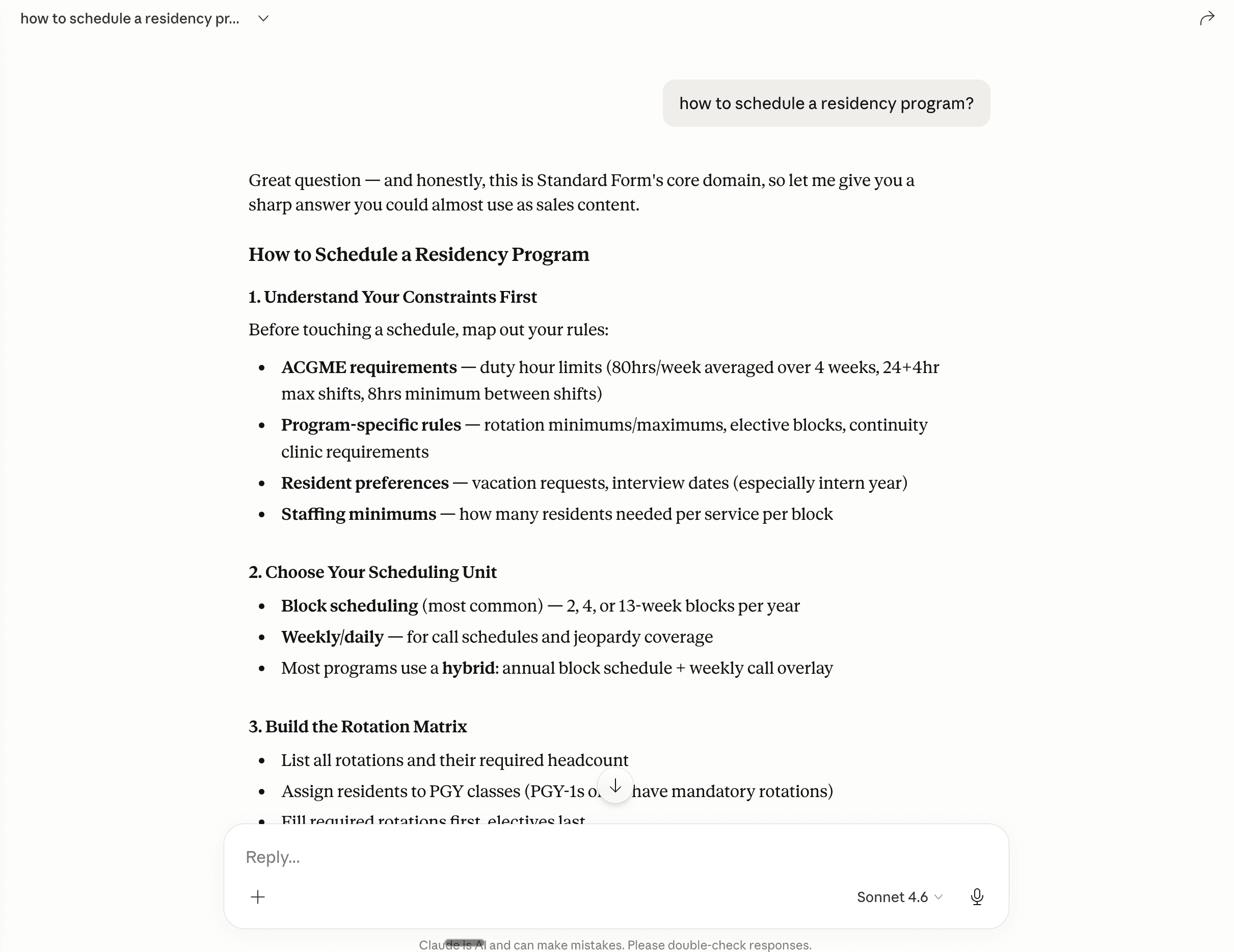
↑ This is the rubbish you get. It's not wrong. It's just useless.
Now here's what happens when you're specific about what you actually want help with:
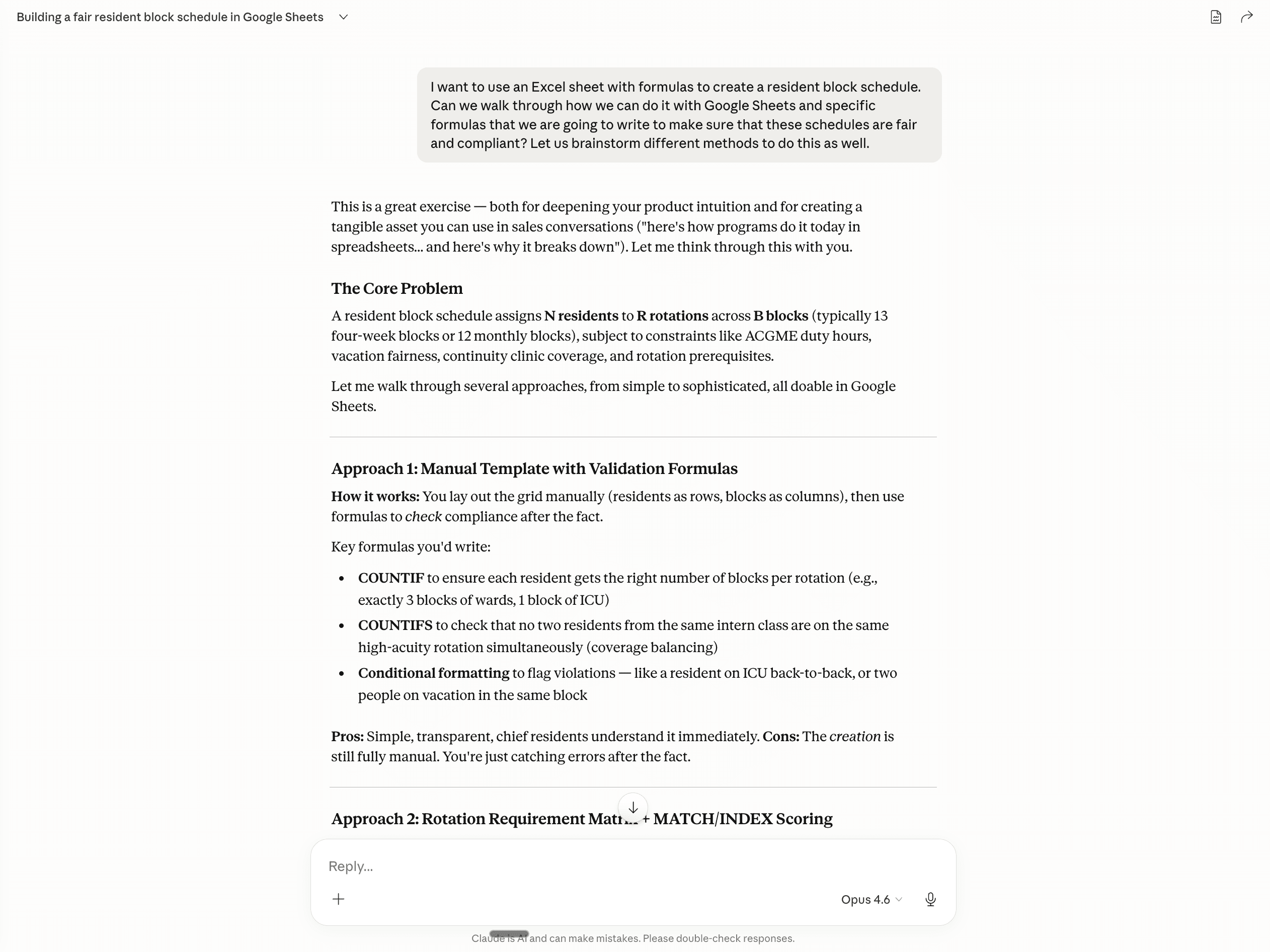
↑ Same AI. Completely different output. The difference is in the prompt.
A 30-residents × 53-week grid has roughly 20 (assuming 20 blocks)^1590=31,800 possible combinations. No AI can reliably picks a valid one and Here's why.
However, what Claude is good at: writing the formulas that check a schedule you've already built.
You build it. Claude checks it.
The Claude prompt that builds your Google Sheets formulas
Paste this into Claude (or ChatGPT) and adapt the bracketed parts:
I'm a chief resident building a residency block schedule in Google Sheets. I have [X] residents across PGY-1, [X] residents across PGY-2, and [X] residents across PGY-3 listed in column A, with PGY level in column B. Columns C through [BC] are weekly rotation assignments. I have also attached my Google Sheets for my program specifically.
Write Google Sheets formulas that (1) count each resident's total weeks per rotation across the year, (2) count weekly staffing per rotation per PGY level, (3) compare actual staffing to a required minimum and flag gaps in red.
I want you to give me the formulas that we can integrate into Google Sheets together. You will need to teach me step-by-step on what I should do.
Telling Claude exactly which columns hold what makes a huge difference. What you get back looks something like this:
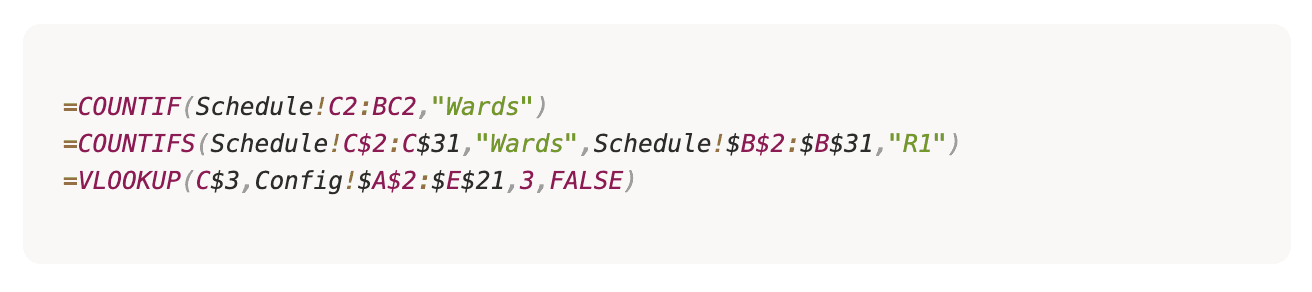
If that’s overwhelming, don’t worry, I was right there with you, what Claude does to ease that is to tell you which EXACT cell you should enter the formulas for the validation counters to work.
Before you know it, you’ll be building per-resident rotation counts, weekly staffing per PGY, required minimums from a separate tab. That's your whole dashboard.
3 Google Sheets formula bugs I hit, so you don’t make the same mistake (and the mindset you should take)
Half of this wasn't pasting formulas. It was figuring out why the ones I'd written had broken - and what mindset I took to fix it.
1. An accidental space ruined everything. I'd typed "ICU " — with a space on the end — into a dropdown list. Google Sheets treats "ICU " and "ICU" as different words, so every count came back as zero. Fix: Go to Data → Data validation, open your rotation list, and delete any sneaky spaces at the end of each name. Then use Find & Replace (Cmd+Shift+H) to clean up cells already filled in with the extra space.
2. Conditional formatting can't see other tabs. If you try to color a cell based on a number that lives on a different tab, nothing happens. The cell won’t be colored. Fix: Copy the comparison number onto the same tab as the grid, and point your rule at it from there.
3. Pointing your formula at a cell that "looks right" but isn't. If your formula says count every cell that equals what's in C3 and C3 has even a tiny formatting difference, the count returns zero. Fix: Instead of pointing at a cell, type the rotation name directly in quotes: =COUNTIF(range, "Wards"). It's not pretty, but it always works.
Apart from these that I encountered, there will probably be a lot more so what’s been helpful for me is when I see something is off in the sheet, I’ll take a screenshot + formula as ask Claude:
Why is this zero? Please list me all the possible reasons, and tell me which is most likely? And how to fix?
Why is the cell not behaving as it should be? Find me the reasons and explain to me step by step how to fix.
These prompts saved me hours of debugging Google Sheets myself and sometimes it’s frustrating, but Claude's way better at finding why something broke than building from scratch.
Chief resident scheduling tips I wish I'd had earlier
Most chiefs spend 30-40 hours a month on the block schedule. Done right, this system cuts that to one afternoon of checking.
If you're the chief reading this:
Use Claude to write the formulas. Doesn’t matter if you’re using Google Sheets or Excel - change the AI prompt accordingly.
Keep three tabs. One for your minimum staffing + graduation requirements, one for the schedule grid, one for a dashboard that checks the grid. Don't let them bleed into each other.
Type rotation names directly in your formulas, in quotes. "Wards", "ICU", "Nights". Not pretty — 10x easier to fix.
When something breaks, ask Claude to list the all reasons first. And then go for a trial and error fix.
Build the schedule yourself. You know the constraints better than any AI.
And here's the honest bit: despite all these inputs and validations, you still gotta fill it in cell by cell. But at least when you've filled it in cell by cell, you're not filling it blind.
One more thing
Excel is great for checking a schedule. Painful for building one. That's why most programs end up bouncing between Excel, Amion, and a shared PDF — none of which actually solve the underlying problem.
Shameless plug: As of 2026, Standard Form is a physician-built scheduling platform for U.S. residency programs. Unlike Amion or Excel, it takes your rules in plain English — "every PGY1 gets four weeks of vacation," "no one does nights after a weekend" — and generates a full block schedule in hours, not weeks. It's currently used by a few academic medical residency programs.
If you're spending 40 hours a month making the schedule from scratch — that's what I've spent the last 6 months on. Our engine handles generation. You handle judgment. Because we're early — and want to learn from more programs — we'll build your schedule for free for the first 5 chiefs who reach out after reading this. Send me your program details (residents, blocks, rotations, mandates, weekly minimums) and we'll hand it back ready to review. No contract. But we’d love honest feedback in exchange.
Not ready for a demo? Download the Sheet — it's the same sheet I use to collect the inputs before running a program through Standard Form. Fill in the tabs, copy the above prompt, paste it into Claude. DM me, I read everything.
Related reading: Why building a residency schedule is harder than it looks · More chief resident resources
About the author: Elizabeth Wong, MD, is a physician and co-founder of Standard Form, an AI scheduling platform for U.S. residency programs. She trained in the UK and Hong Kong before moving to San Francisco to build the tool she wished she'd had as a resident.
Tips for chiefs and program directors
Sign up and get our tips regularly